Paytrail is legally required under the Act on Detecting and Preventing Money Laundering and Terrorist Financing to identify the beneficial owners of companies using our service. Paytrail cannot transfer funds to a company whose beneficial owners are unknown. A beneficial owner is always a natural person. Find step-by-step instructions plus links that explain who qualifies as a beneficial owner and what it means if someone is a politically exposed person (PEP).
Step by step: Add beneficial owners
- Sign in to the Merchant Panel.
- From the left-hand menu, select Merchant account
- Open the Owners and beneficial owners tab and select Edit information.
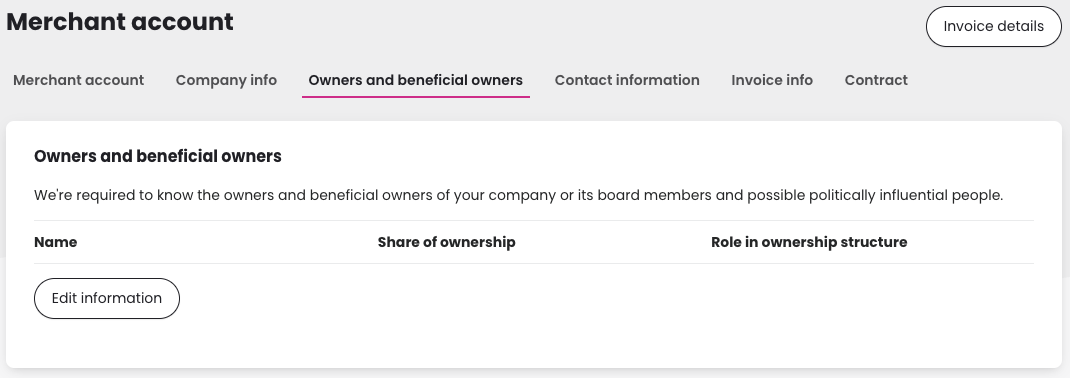
- Select Company or Person before entering details. Learn more about who qualifies as a beneficial owner.

- Add the details of all beneficial owners:
- Enter the required personal information.
- Select the person’s role or ownership and the basis for it.
- Indicate whether they have signing rights.
- Confirm whether the person is a politically exposed person (PEP). Learn more about what it means to be a politically exposed person.
- Click Save.
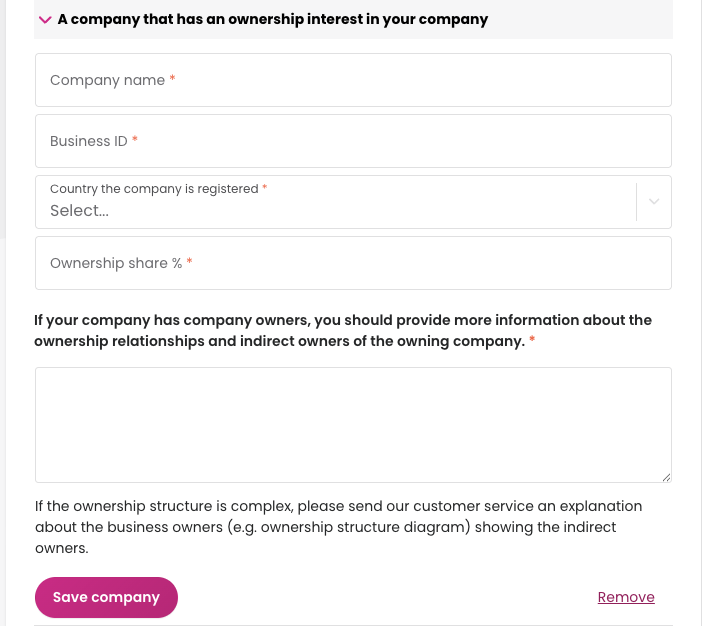
If another company owns more than 25% of shares
If another company directly or indirectly owns more than 25% of your company’s shares, add the requested information about that company as well and save.