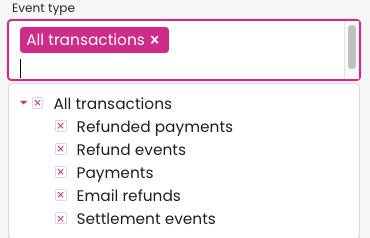
Learn how to find refunds quickly in the Merchant Panel using the Event type search options. You can filter by refunded payments, refund events, or email refunds, making it easier to track exactly what you need. This lets you confirm processed refunds, distinguish between refund transactions and original payments, and verify email refunds sent to customers.
Step by step: Search for refunds in the Merchant Panel
- Sign in to the Merchant Panel.
- From the left-hand menu, select Payments.
- Click Show more to open the Event type field. The available search options are:
- Refunded payments: shows payments that have already been refunded.
- Refund events: shows refund transactions, not the original payments.
-
Email refunds: shows refunds where the customer received an email with a secure link to provide their account number.