Refunds should always be created in the Merchant Panel so the money is returned to the same payment method the customer originally used. This also prevents unnecessary invoices when credit cards or Buy now, Pay later payment methods are used. Refunds are deducted from your merchant account balance, so check you have enough funds available or transfer additional funds before creating a refund. Most refunds are processed automatically, but in some cases the refund is handled by email.
Learn how to transfer funds to your merchant account
If you are using your own agreements with banks or card provider via our service, refunds must be handle through the bank's or card provider's system. It will not be possible to make refunds in the Merchant Panel.
Step by step: Create a refund in the Merchant Panel
- Sign in to the Merchant Panel.
- From the left-hand menu, select Payments.
- Use the search options to locate the payment you want to refund. See payments search for details on the search options.
- From the Latest payments list, click the payment to open its details.
- Scroll to the Order content and refunds section and enter the refund amount.
- You can issue a full or partial refund by entering the amount.
- The comment field is for your own notes and is not shown to the customer.
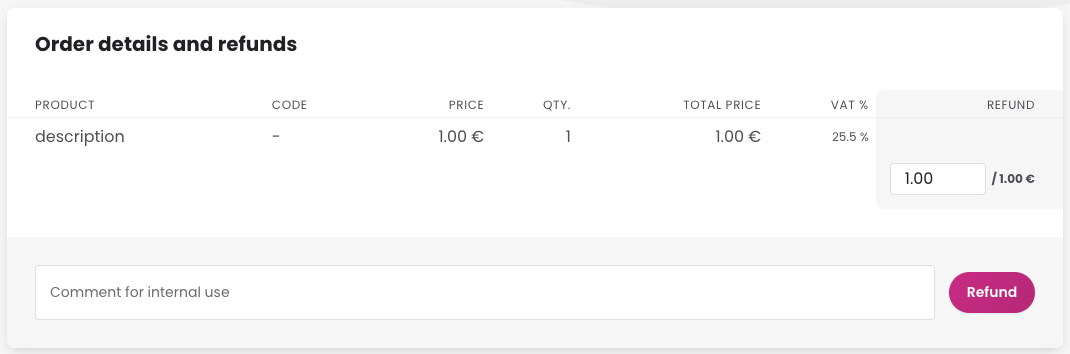
- Click Refund to complete the refund.
Refund approval
Refund approval adds an extra layer of control by requiring two different users for each refund: one to create it and another to approve it.
How to activate refund approval and assign the right roles
- Sign in to the Merchant Panel.
-
From the left-hand menu, go to Settings and activate refund approval.

- Open User management and assign the roles:
- Initiating refunds for users who can create refunds
- Refund approval for users who can approve refunds