Paytrail may appear as the payment recipient on your bank statement when you pay an online business using an online bank payment. Online bank payments made through Paytrail follow a clear, secure flow that ensures your payment reaches the correct business. Your bank first transfers the money to Paytrail’s customer reserve account, the business receives a confirmation that the payment was completed, and Paytrail forwards the funds to the online business.
To make sure the payment is routed correctly, always complete the payment through the business’s website, app, or a payment link sent by the online business.
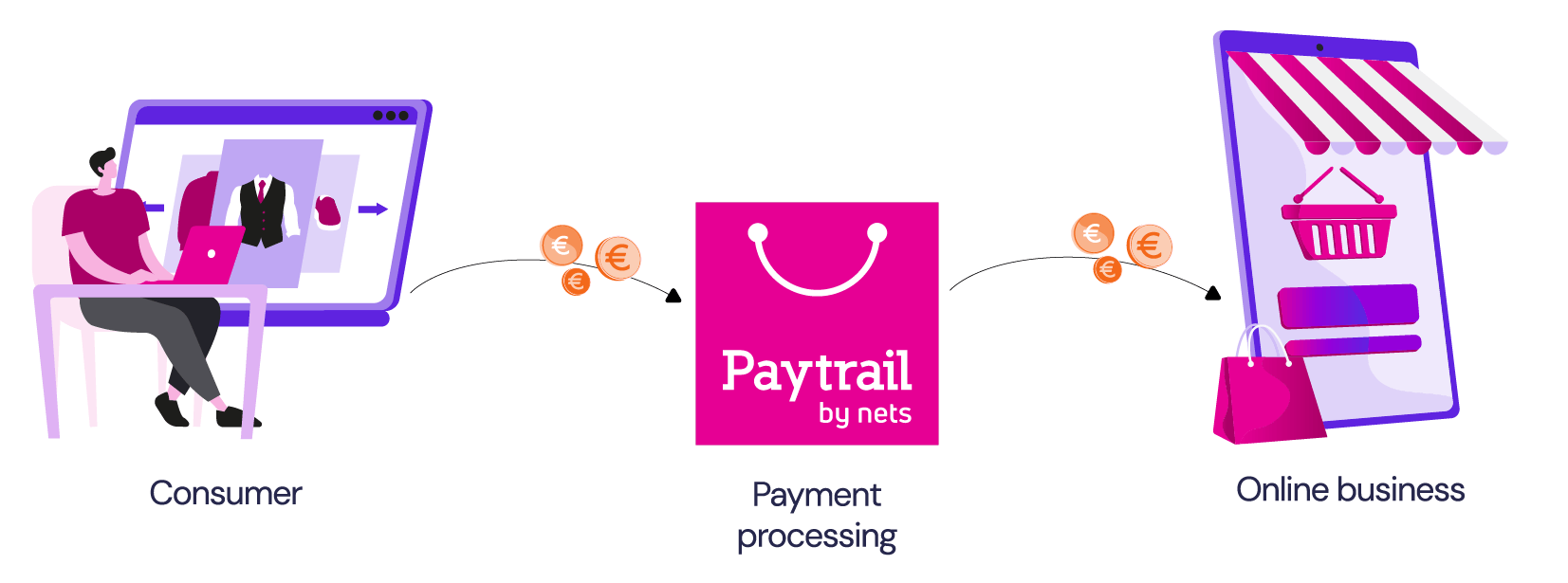
How the online bank payment flow works
Online bank payments made through Paytrail move through three stages:
- After you approve the payment in your bank’s system, the money is transferred to Paytrail’s customer reserve account. This is why Paytrail may appear as the payment recipient on your bank statement.
- The business receives a confirmation that the payment has been completed successfully.
- Paytrail forwards the money from Paytrail’s account to the online business.
Do not make manual payments to Paytrail
Paytrail account numbers may appear in your online bank after you complete an online bank payment through Paytrail. These account numbers are used as part of the payment flow and should not be used to create new payments.
A manual payment means creating a new payment in your online bank using Paytrail’s account number instead of completing the payment through the online business’s website, app, or payment link.
This can happen if you:
- Create a new payment in your online bank using a Paytrail account number from a previous payment.
- Copy a previous payment to Paytrail and use it as the basis for a new payment.
- Reuse payment details from an earlier Paytrail payment when paying the same online business again.
If you make a separate payment directly in your online bank using Paytrail’s account number, the payment may not be matched to the correct online business.
Paytrail account numbers include FI2650000120480743, FI3150000120480750 and FI3050000120480768. Do not use these account numbers to create new payments in your online bank.
How to make another payment to the same online business
If you need to make another payment to the same online business, for example for an order addition, delivery fee, rent, phone service, membership fee, or donation, do not reuse the payment details from a previous Paytrail payment.
- Make a new payment through the online business’s website, app, or customer portal.
- Or contact the online business and ask for their own bank account number if they want you to pay them directly.
If you think you made a payment incorrectly
If you made a manual payment to Paytrail or used old Paytrail payment details, the payment may not have reached the online business.
See what to do if your payment did not reach the online business.