When using Klarna via Paytrail, you have both a Paytrail Merchant ID and a separate Klarna account ID. Learn where to find your Klarna account ID in the Klarna Partner Portal and how to identify Klarna accounts via Paytrail. Your Klarna account ID may be needed for Klarna-related support requests.
Find your Klarna account ID
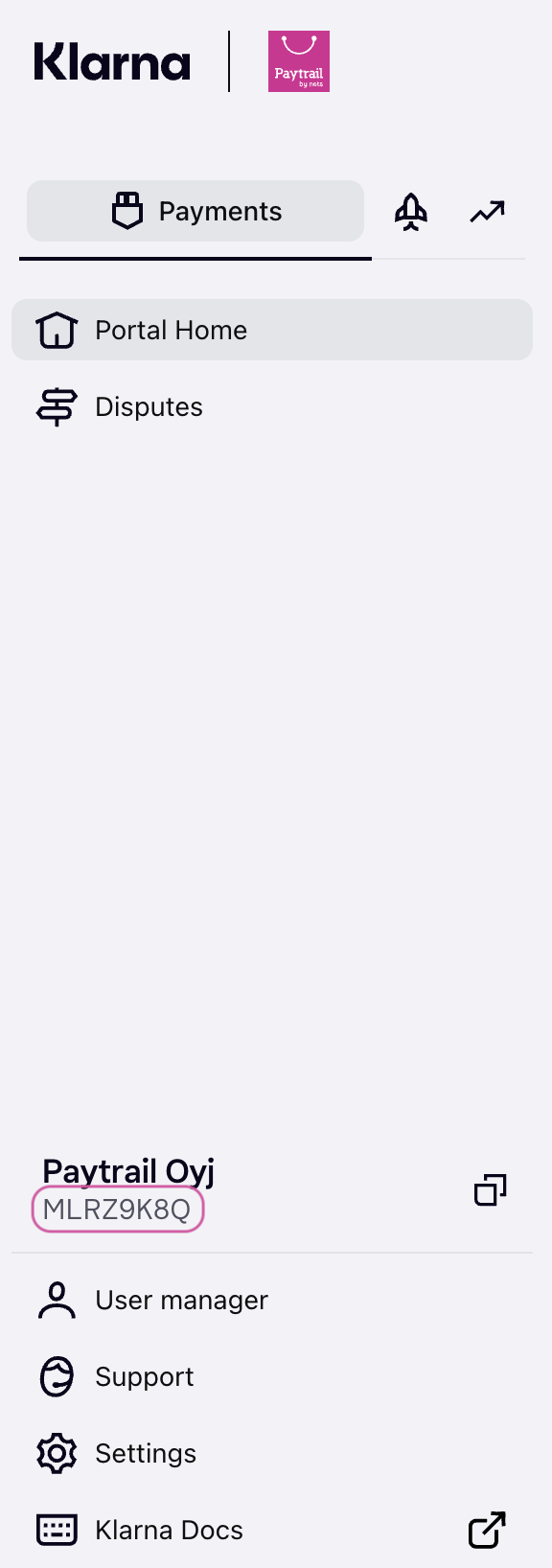
You can find your Klarna account ID in the left-hand menu of the Klarna Partner Portal.
- If you have access to multiple Klarna accounts, use the account selector dropdown to choose the correct account.
- Klarna accounts via Paytrail display the Paytrail logo next to the Klarna logo.
- Klarna via Paytrail account IDs typically begin with M and are 8-character identifiers that include both letters and numbers.
-
If you only have one Klarna account, your account ID is shown directly in the menu.
If you contact our customer service team about your Klarna account, please include your Klarna account ID, Merchant ID, and Business ID so we can assist you faster. You can find your Merchant ID in the Merchant panel under Merchant account.